



Artículo de
M. Skipper
Fundador y director · Craft'n Build Creator Studio
Un moodboard que prioriza la estética sobre la lógica estructural es simplemente un collage, no una herramienta profesional. Aunque una disposición artística de imágenes puede captar una sensación fugaz, a menudo no proporciona la hoja de ruta técnica necesaria para la ejecución en el mundo real. Probablemente hayas experimentado la frustración del bloqueo ante una página en blanco o la dificultad de explicar una «atmósfera» específica a un cliente que exige certeza técnica. Es difícil traducir una atmósfera vaga en elecciones concretas de materiales que resistan el escrutinio profesional.
Esta guía te ayudará a dominar la transición de la inspiración inicial a una ejecución disciplinada. Al utilizar plantillas editables de moodboards diseñadas específicamente para arquitectos de interiores, establecerás una base visual coherente que acelerará los ciclos de aprobación de los clientes y garantizará la coherencia del proyecto. Examinaremos los nueve estilos esenciales que definen el panorama de 2026, incluidos el moderno orgánico y el clásico, y proporcionaremos un punto de partida respaldado por una metodología para tu flujo de trabajo. Aprenderás a ir más allá de las «imágenes bonitas» superficiales hacia un enfoque sistemático que valore tanto la utilidad como la artesanía refinada. Se trata de convertir una visión en una realidad construible.
Conclusiones clave
- Cambia tu mentalidad: pasa de crear collages sencillos a construir arquitecturas visuales que definan las relaciones entre materiales y espacios.
- Identifica plantillas editables de moodboards de alta calidad que priorizan la precisión técnica mediante capas organizadas y un mapeo auténtico de las relaciones entre materiales.
- Explora nueve estilos arquitectónicos distintos para encontrar un punto de partida respaldado por una metodología que evite la deriva estética durante la fase de ejecución.
- Domina la transición de la inspiración abstracta a la documentación técnica, incluido cómo tu concepto visual informa la Clave de diseño del plano de planta.
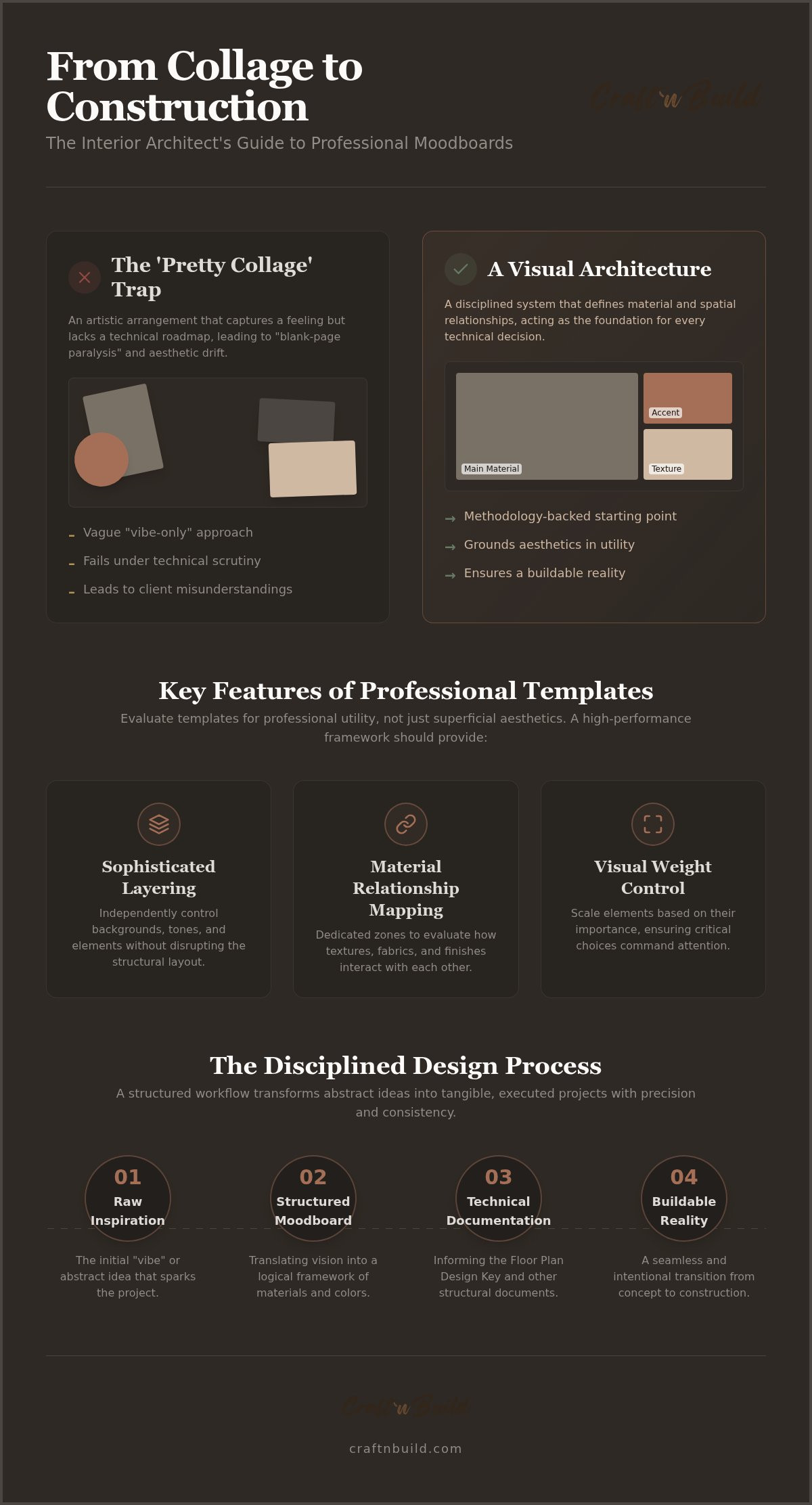
La diferencia entre un «collage bonito» y el pensamiento de diseño profesional
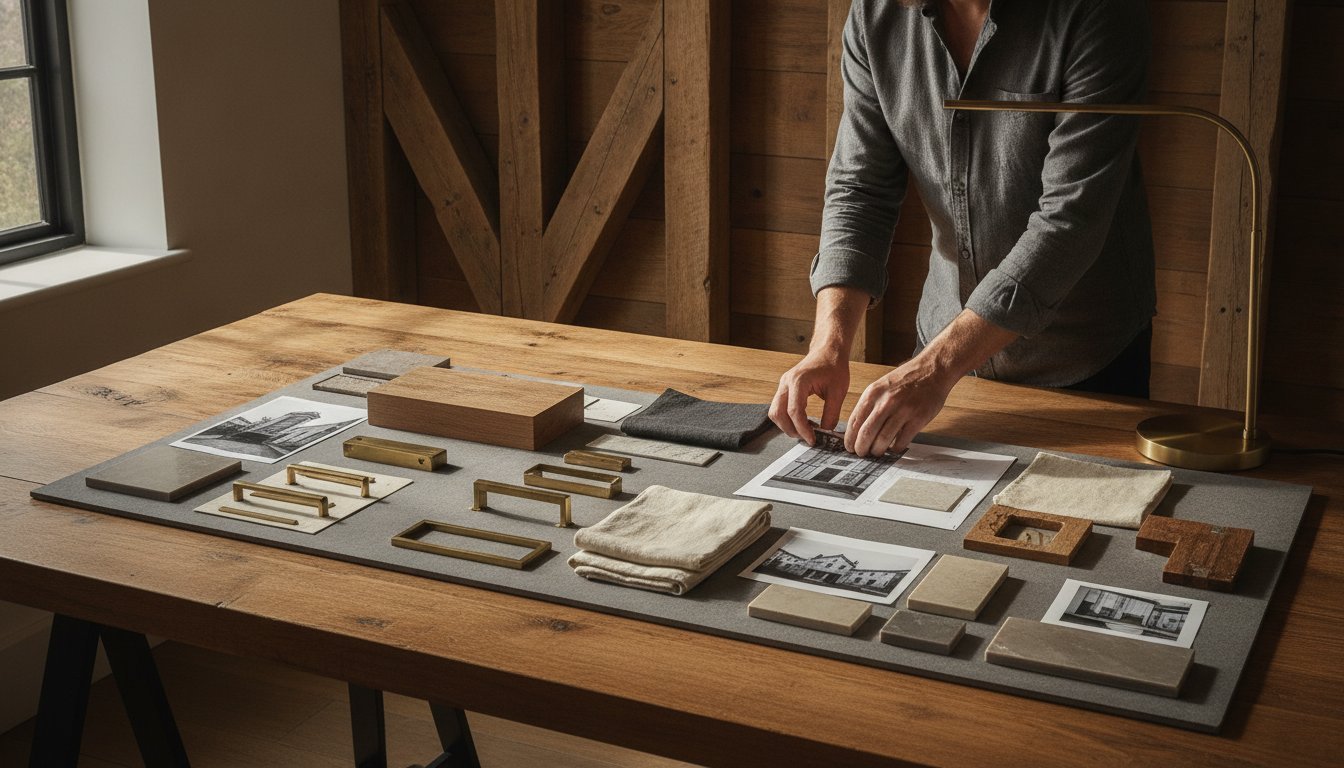
Un moodboard profesional actúa como ancla visual para relaciones complejas entre materiales y espacios. Es mucho más que una disposición artística de texturas o una simple colección de imágenes inspiradoras. Aunque los recursos básicos podrían explicar ¿Qué es un moodboard? como una herramienta creativa general, el arquitecto de interiores necesita que funcione como la primera etapa de la lógica estructural. Es la base sobre la que se construye cada decisión técnica posterior. Sin este inicio sólido, el proyecto corre el riesgo de perder su identidad central antes de que siquiera se finalice el primer plano de planta.
Los marcos rigurosos evitan la trampa habitual de la deriva estética. Este fenómeno ocurre cuando la visión inicial se disuelve durante la fase de ejecución porque el diseño carecía de un punto de partida respaldado por una metodología. Un enfoque basado únicamente en la «sensación» es insuficiente para obtener resultados de alto nivel. Necesitas un sistema que capture la atmósfera junto con sistemas cromáticos precisos y elecciones de materiales táctiles. Por eso, la creación disciplinada de moodboards se presenta como la primera fase crítica de The Design Key - Interior Design Course Programme. Garantiza que la transición del pensamiento abstracto a la construcción física siga siendo fluida e intencionada.
Por qué es importante la metodología en las presentaciones visuales
Un enfoque estructurado garantiza que cada elección estética siga fundamentada en la utilidad. Al establecer pronto un lenguaje visual coherente, simplificas la comunicación con el cliente y reduces el riesgo de costosos malentendidos. Utilizar The Mood Board Design Key te permite avanzar deliberadamente desde la inspiración hasta la aplicación técnica. Se trata de transformar elementos en bruto en un producto terminado y profesional que inspire confianza. Esta progresión sistemática crea una sensación de orden que tranquiliza a los clientes al demostrar tu dominio de la complejidad del proyecto.
Cómo superar la parálisis ante la página en blanco para arquitectos
Los arquitectos suelen enfrentarse a la abrumadora tarea de empezar desde cero. Esta parálisis ante la página en blanco desperdicia tiempo valioso y energía mental que deberían dedicarse a la precisión técnica y la artesanía. Utilizar plantillas editables de moodboards proporciona un punto de anclaje lógico inmediato para tu proceso creativo. Psicológicamente, es más fácil perfeccionar una estructura profesional existente que construir una desde cero. Estas plantillas funcionan como el secreto de un innovador disciplinado, conectando las habilidades manuales tradicionales con las herramientas digitales modernas. Al adoptar una mentalidad de «la lógica primero», te aseguras de que cada elección de material sea viable para la construcción. No solo estás seleccionando imágenes; estás definiendo la integridad estructural de tu futuro espacio. Las plantillas editables de moodboards de alta calidad te permiten centrarte en perfeccionar el trabajo artesanal en lugar de en los aspectos mecánicos de la composición.
Características clave que evaluar en las plantillas editables de moodboards
Seleccionar las plantillas editables adecuadas para moodboards requiere centrarse en la utilidad profesional, no en la estética superficial. La función principal de una plantilla es servir como un marco de alto rendimiento para tu proceso de pensamiento de diseño. Esto comienza con una organización sofisticada de las capas. Debes poder cambiar los fondos o modificar los valores tonales sin comprometer la estructura de la composición. Si una plantilla se rompe al ajustar un solo elemento, no cumple con los estándares de un software de nivel profesional. Las plantillas de alta calidad facilitan los siguientes requisitos técnicos:
- Organización de capas: Garantiza un control independiente de los fondos y los cambios tonales sin alterar la composición.
- Mapeo de las relaciones entre materiales: Proporciona zonas específicas para texturas, telas y muestras de pintura con el fin de evaluar las interacciones táctiles.
- Control del peso visual: Permite escalar los elementos según su importancia en la narrativa de diseño del proyecto.
Las plantillas eficaces también permiten realizar un análisis profundo de los materiales. No se trata solo de colocar imágenes, sino de evaluar cómo interactúa la veta de una madera específica con el tejido de un textil o el acabado de una pintura. Necesitas poder ajustar el peso visual de los distintos elementos para garantizar que las decisiones materiales más importantes reciban la atención adecuada dentro de la composición.
Estándares técnicos para plantillas profesionales
Las presentaciones de proyectos de alto riesgo para clientes exigen precisión técnica. Tus plantillas deben estar listas para imprimir y tener una alta resolución para garantizar que cada textura y matiz de color sea visible. La compatibilidad con los flujos de trabajo digitales establecidos es innegociable. Un componente fundamental de esta base técnica es la integración de sistemas de color profesionales. Utilizar el Sistema de color: crea paletas profesionales garantiza que tu atmósfera visual esté respaldada por una teoría del color que se traduzca en el espacio físico.
Flexibilidad frente a rigidez
Una plantilla superior proporciona una estructura disciplinada y, al mismo tiempo, permite total libertad estética. Debe guiar la mirada a través de una narrativa de diseño lógica sin volverse demasiado recargada ni distraer. Evita las composiciones que priorizan el diseño propio de la plantilla sobre el concepto central del proyecto. El objetivo es crear una sensación de orden que te permita ejecutar tareas complejas con confianza. Este enfoque metódico es una característica distintiva de nuestros programas de diseño de interiores, donde enseñamos la intersección entre utilidad y estética.
Al tratar la base visual como un recurso riguroso, garantizas una transición fluida del moodboard al proyecto maestro. Las plantillas editables de moodboards profesionales son el punto de partida lógico para cualquier arquitecto de interiores serio que valore la precisión técnica y la integridad estructural.
Comparación de estilos: ¿Qué plantilla de moodboard encaja con tu proyecto?
El lenguaje visual de un proyecto debe alinearse perfectamente con su intención estructural. Elegir el punto de partida correcto de nuestra gama de plantillas editables de moodboards no es solo una decisión estética; es una decisión estratégica. En la colección de Craft'n Build encontrarás 9 estilos distintos diseñados para satisfacer los requisitos específicos de diversos entornos arquitectónicos. Esta variedad garantiza que tu pensamiento de diseño se mantenga disciplinado, independientemente de la complejidad del proyecto. Cada plantilla funciona como un ancla lógica que evita la «deriva estética» que a menudo compromete los resultados de alta gama.
Las plantillas Moderno y minimalista se centran en líneas limpias y en el uso deliberado del espacio negativo para lograr claridad arquitectónica. Esto es esencial en proyectos residenciales de alta gama donde la propia estructura es el elemento principal. Por el contrario, el estilo Moderno orgánico equilibra materiales en bruto y táctiles con una lógica estructural contemporánea. Es una opción ideal para diseñadores de muebles que necesitan destacar la intersección entre maderas nobles y piedra. Para proyectos que requieren referencias históricas o tradicionales, las plantillas Clásico y Ecléctico ofrecen una forma de organizar paletas complejas sin perder el rigor profesional. Estos marcos permiten integrar elementos variados y mantener al mismo tiempo una narrativa cohesionada. Los estilos regionales, como Costero, adaptan el lenguaje visual a contextos ambientales específicos, garantizando que el diseño se sienta arraigado en su ubicación física.
Plantillas destacadas de la colección de 2026
Varias plantillas de nuestra colección actual se han convertido en herramientas esenciales para el profesional metódico. La plantilla «Moderno y minimalista» se utiliza con frecuencia en proyectos residenciales de alta gama que exigen una filosofía de «menos es más». Proporciona el espacio negativo necesario para que los elementos arquitectónicos respiren. Para quienes se centran en la naturaleza táctil de la creación, la opción «Moderno orgánico» es la elección superior. Destaca el refinamiento de elementos en bruto hasta convertirlos en productos acabados, por lo que es una de las favoritas de los diseñadores de muebles. Por último, la plantilla «Clásico» sigue siendo el estándar para proyectos que requieren un profundo conocimiento de los materiales y precisión histórica.
Adaptar el estilo al briefing del cliente
Todo proyecto exitoso comienza con una comprensión profunda de las necesidades del cliente. Debes seleccionar la plantilla basándote en los principios fundamentales establecidos en The Brief: The Design Key Series. Esto garantiza que el tono visual coincida tanto con los requisitos emocionales como con los funcionales del espacio. A menudo, las distintas estancias requieren puntos de partida diferentes para lograr los mejores resultados. Por ejemplo, los requisitos estructurales de Diseño de cocinas pueden exigir una plantilla más técnica y centrada en la funcionalidad. En cambio, el Diseño de dormitorios suele beneficiarse de una composición que prioriza las formas suaves y una narrativa emocional cohesionada. Al adaptar la plantilla al briefing específico, estableces un camino probado hacia el éxito.
Errores comunes al usar plantillas editables
La disciplina profesional es la frontera entre un maestro y un aficionado. Aunque las plantillas editables de moodboards proporcionan la estructura necesaria para un proyecto, no eximen al diseñador de tomar decisiones rigurosas. Uno de los errores más frecuentes es sobrecargar la composición. Cuando incluyes demasiadas imágenes, pierdes el «pensamiento de diseño» que debería guiar el proyecto. Cada recurso debe cumplir un propósito específico. Si una imagen no aclara una relación entre materiales o un concepto espacial, debe eliminarse para mantener la claridad.
La falta de jerarquía agrava aún más este problema. Si todas las muestras y fotografías tienen el mismo tamaño, el cliente no sabrá dónde centrar la atención. Debes aprovechar la flexibilidad de la plantilla para establecer un orden visual claro. Los elementos más grandes deben representar los materiales fundamentales del proyecto, mientras que los acentos más pequeños aportan el detalle necesario. Así evitas que la presentación se convierta en un collage confuso y, en su lugar, la transformas en una hoja de ruta lógica.
Ignorar la lógica de los materiales es un fallo crítico que socava tu autoridad. Es fácil seleccionar imágenes que parecen armoniosas en una pantalla, pero que son imposibles de materializar en la realidad. Podrías combinar un textil delicado, pensado únicamente para interiores, con un entorno exterior, o sugerir un acabado de madera que no puede conseguirse para la aplicación requerida. La iluminación incoherente entre tus recursos visuales también crea una atmósfera fragmentada. Asegúrate de que la temperatura de color de tus imágenes se mantenga cohesionada para conservar la resonancia emocional y el acabado profesional del proyecto.
Mantener la disciplina profesional
Un aprendiz serio entiende que el estilo nunca debe anteponerse a la lógica estructural. No estás vendiendo solo una «vibra»; estás proponiendo una realidad construible. Para fundamentar tus recursos visuales en la precisión técnica, considera los principios que se enseñan en el curso de dibujo técnico para diseño de interiores. Esta metodología garantiza que tu visión creativa siempre esté respaldada por la viabilidad de ingeniería y la calidad artesanal.
Errores técnicos al crear moodboards digitales
La precisión técnica también se extiende a la calidad de tus recursos digitales. Utilizar imágenes de baja resolución que se pixelan durante una presentación al cliente es señal de una ejecución deficiente. Sugiere una falta de atención al detalle que hará temer a los clientes que esa carencia se traslade a la fase de construcción. Además, debes documentar las fuentes específicas de cada material mostrado. Un moodboard que no puede traducirse en una lista de especificaciones no es más que un sueño. Por último, respeta el «espacio en blanco» de tus plantillas editables de moodboards. El espacio negativo no está vacío; es el margen de respiración que permite comprender correctamente tu concepto de diseño.
Adopta una metodología rigurosa en cada fase del proyecto explorando nuestros programas de diseño de interiores.
Próximos pasos: del moodboard al proyecto maestro
El moodboard sirve como plano conceptual de la realidad técnica de un proyecto. No es un documento estático; es un marco vivo que debe evolucionar a medida que avanza el diseño. Esta base visual informa directamente a la Design Key de planos de planta, donde la atmósfera abstracta se traduce en realidad espacial. Pasas de la calidad táctil de una muestra textil a la precisión técnica necesaria para los planos de iluminación y la documentación estructural. Esta transición es vital para mantener la integridad del proyecto. Tiende un puente entre cómo se siente un espacio y cómo funciona realmente bajo el escrutinio profesional.
Pasar de la atmósfera visual a la documentación técnica requiere un enfoque disciplinado. Dominar este proceso es la razón por la que el moodboard se presenta como el punto de entrada esencial al programa maestro Design Key. Debes comprender el «porqué» detrás de cada elección de material antes de poder ejecutar el «cómo» en un paquete de planos constructivos. Al establecer una metodología rigurosa desde el principio, garantizas que la narrativa del diseño se mantenga coherente desde la primera reunión con el cliente hasta la revisión final. Esta es la diferencia entre un proyecto que simplemente tiene buen aspecto y uno construido con lógica estructural.
Integrar la IA en tu flujo de trabajo
Los flujos de trabajo modernos exigen un equilibrio entre la metodología tradicional y la innovación digital. Puedes utilizar Implementación de IA para arquitectos y diseñadores para generar recursos y texturas específicos para tus presentaciones. Esta integración acelera considerablemente la fase de inspiración sin obligarte a ceder el control profesional. La IA debe funcionar como una herramienta sofisticada para transformar elementos en bruto en productos terminados. Te permite explorar más rápido las relaciones entre materiales, siempre que mantengas una mentalidad basada en la lógica. El objetivo es mejorar tu productividad y preservar al mismo tiempo la artesanía que define la reputación de tu estudio.
Crear tu biblioteca profesional de recursos
Un estudio profesional se define por la calidad de sus herramientas fundamentales. Los diseñadores serios invierten en plantillas editables de moodboards de alta calidad porque proporcionan un sistema reproducible para alcanzar el éxito. Aunque las alternativas gratuitas pueden ofrecer resultados rápidos, a menudo carecen de los estándares técnicos necesarios para presentaciones de alto nivel ante clientes. Una biblioteca de plantillas editables de moodboards guiada por una metodología te permite comenzar cada proyecto con confianza y superar al instante el bloqueo ante la página en blanco. Establece un alto estándar para tu trabajo y garantiza la coherencia en todo tu portafolio. Invierte en herramientas que respeten la complejidad de tu oficio.
Da el siguiente paso en tu desarrollo profesional. Explora la colección de plantillas editables de moodboards para encontrar la base estructural de tu próximo proyecto insignia.
Dominar la arquitectura visual de tu próximo proyecto
Transformar la inspiración en bruto en una realidad viable requiere más que buen ojo para el estilo; exige una metodología rigurosa. Has aprendido que un moodboard profesional es el ancla visual de cada decisión técnica posterior. Al adoptar una mentalidad basada en la lógica, te aseguras de que el concepto de tu diseño se mantenga cohesionado desde la idea hasta la construcción. Nuestra colección de plantillas editables de moodboards proporciona esta base estructural mediante nueve estilos arquitectónicos distintos, cada uno totalmente personalizable para presentaciones de alta gama.
Estos diseños basados en una metodología hacen mucho más que resolver el bloqueo ante una página en blanco. Establecen un camino comprobado y repetible hacia el éxito que tranquiliza a tus clientes y agiliza tu flujo de trabajo de diseño. Es hora de dejar atrás los collages superficiales y adoptar un sistema que valore la artesanía y la precisión técnica. Todo profesional experto sabe que la preparación es la clave de la maestría y la integridad estructural.
Explora la colección de plantillas editables de paneles de inspiración profesionales y comienza hoy la transición hacia tu proyecto maestro. Tienes las herramientas para lograr resultados de alto nivel; ahora es el momento de ejecutarlo con confianza y constancia.
Preguntas frecuentes
¿Qué software necesito para utilizar estas plantillas editables de paneles de inspiración?
Estas plantillas están diseñadas principalmente para utilizarse en Canva y ofrecen una interfaz digital moderna para flujos de trabajo profesionales. No necesitas un software CAD costoso para comenzar la fase conceptual. Al utilizar una plataforma basada en la nube, puedes acceder a tus plantillas editables de paneles de inspiración desde cualquier dispositivo, lo que garantiza que tu proyecto siga siendo móvil y colaborativo. Esta accesibilidad te permite perfeccionar tus diseños en tiempo real, manteniendo la precisión técnica necesaria para las presentaciones arquitectónicas.
¿Puedo utilizar estas plantillas tanto para proyectos de diseño de interiores residenciales como comerciales?
Sí, la lógica estructural de estos marcos es aplicable a cualquier entorno espacial. Tanto si diseñas una residencia privada de alta gama como una oficina comercial compleja, la metodología sigue siendo la misma. Las plantillas te ayudan a definir las relaciones entre los materiales y el flujo espacial, independientemente de la escala del proyecto. Al utilizar un marco profesional coherente, garantizas que cada proyecto de tu estudio siga un proceso disciplinado y repetible hacia una ejecución exitosa y la aprobación del cliente.
¿Las imágenes están incluidas en las plantillas o debo proporcionar las mías?
Las plantillas incluyen imágenes de referencia de alta calidad para mostrar la composición y el peso visual previstos. Sin embargo, debes integrar tus propios recursos específicos del proyecto para crear una presentación verdaderamente auténtica. Puedes obtener texturas de materiales, muestras de telas y acabados de pintura que reflejen los requisitos técnicos específicos de tu proyecto. Esta transición de la inspiración genérica a la elección concreta de materiales es lo que distingue a un arquitecto profesional de un decorador aficionado que depende de imágenes de archivo.
¿En qué se diferencian estas plantillas de los creadores gratuitos de paneles de inspiración, como Canva?
A diferencia de las herramientas genéricas que priorizan la estética superficial, estas plantillas se basan en una metodología de diseño rigurosa. Priorizan el mapeo de las relaciones entre materiales y la lógica estructural por encima de los collages sencillos. Cada diseño está influido por el diseño danés, lo que garantiza que tu presentación funcione como una hoja de ruta técnica y no solo como una imagen bonita. Las plantillas profesionales editables de paneles de inspiración ofrecen la organización por capas y la preparación para impresión que a menudo les faltan a las herramientas gratuitas de nivel básico para consumidores cuando se trata de trabajos arquitectónicos serios.
¿Puedo personalizar las paletas de colores y los fondos de todas las plantillas?
Cada elemento de la colección es totalmente personalizable para adaptarse a las necesidades específicas de tu proyecto. Puedes cambiar los fondos, modificar los valores tonales y ajustar el peso visual de las muestras de materiales sin alterar la estructura subyacente. Esta flexibilidad te permite mantener una disciplina profesional mientras exploras diversas direcciones creativas. Al perfeccionar la estructura existente, ahorras tiempo y evitas la parálisis de empezar desde una página en blanco durante las primeras fases conceptuales.
¿Hay alguna plantilla específica recomendada para diseñadores de muebles?
La plantilla Organic Modern es la opción ideal para diseñadores de muebles que se centran en la naturaleza táctil de la creación. Destaca la intersección entre materiales en bruto, como maderas duras y piedra, y la lógica estructural contemporánea. Este marco te permite resaltar el refinamiento de los elementos en bruto hasta convertirlos en productos acabados, proporcionando una base visual clara para tu trabajo artesanal. Está diseñado específicamente para mostrar cómo interactúan las diferentes texturas y vetas de los materiales en un espacio físico.
¿Estas plantillas siguen una metodología de diseño específica?
Estos marcos están diseñados como punto de entrada al Programa Maestro Design Key. Siguen un enfoque basado en una metodología que prioriza la preparación y un conocimiento profundo de los materiales. Cada plantilla está influida por la precisión técnica del diseño danés, fomentando una mentalidad que antepone la lógica. Esto garantiza que tu atmósfera visual siempre esté respaldada por una realidad viable. Al adoptar este sistema riguroso, estableces un alto estándar de trabajo que inspira confianza en tus clientes.
¿Cuál es la mejor manera de presentar estos paneles de inspiración a un cliente de alta gama?
Las presentaciones de alta gama requieren un equilibrio entre claridad digital y realidad táctil. Aunque estas plantillas están listas para imprimir y ofrecen alta resolución para pantallas digitales profesionales, debes acompañarlas con muestras físicas de materiales. Presentar tu panel de inspiración junto con muestras reales de tejidos o madera refuerza la integridad estructural del proyecto. Este enfoque metódico demuestra tu dominio del oficio y ofrece un camino transparente y comprobado hacia el éxito, lo que tranquiliza al cliente sobre tu competencia técnica.
Socios
Craft'n Build da la bienvenida a los profesionales del marketing de afiliación, https://craftnbuild.com/pages/affiliate-partner-programme-1


Compartir:
Implementación de la IA en el flujo de trabajo de diseño: un marco profesional para 2026
Implementación de la IA en el flujo de trabajo de diseño: un marco profesional para 2026